CommLinc Overview
CommLinc is a comprehensive Commodity Trading and Logistics Management extension for Microsoft Dynamics 365 Business Central.
It is specifically designed to enhance Business Central's core functionality by adding support for the management of:
- Commodity Contracting,
- Futures Trading,
- Logistics, and
- Transport Broking.
As an extension of Business Central it leverages standard functionality such as Inventory, Accounts Receivable, Accounts Payable, and General Ledger.
Table of Contents
Contracts
The contract is the starting point of a commodities trade. A comprehensive contracts list displays the state of contracts with real-time information on Estimated Deliveries, Actual Deliveries, Hedged Quantity and Invoiced Quantity, giving the contract manager a bird's-eye view of the contract portfolio.
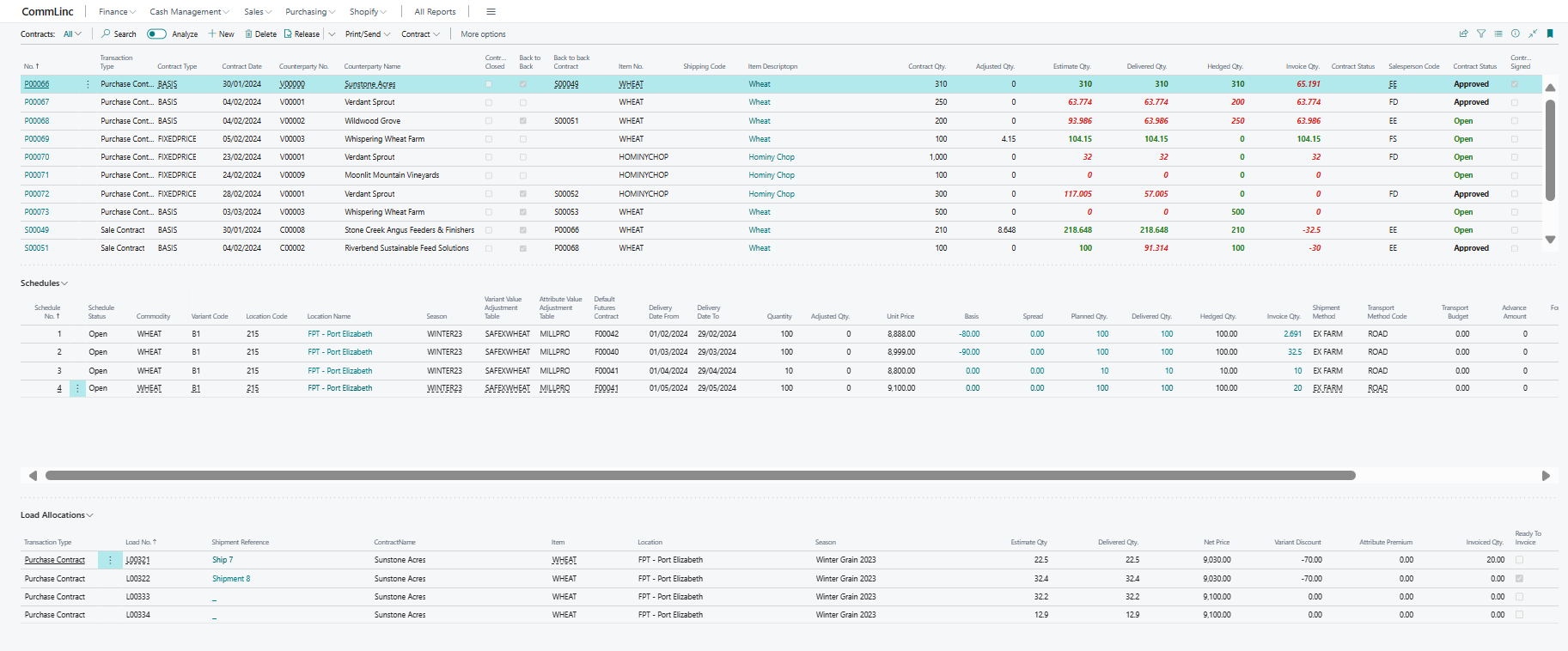
Each contract's Schedule details are shown in the schedules grid, which updates in real time as the selected contract changes. For each schedule in the schedules grid, the Loads allocated to that schedule are displayed in the Load Allocations grid.
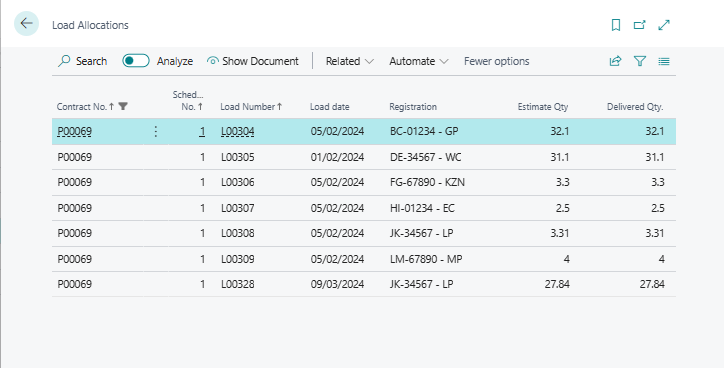
Throughout CommLinc the user has the ability to Drill Down to view underlying data. For example, clicking on Delivered Qty for any contract opens a drill-down window displaying the records that make up that metric, as shown below.
Selecting a contract for editing opens the Contract Card, which provides a detailed view of the record. The Contract Card is comprised of eight expandable sections, each covering a different aspect of the contract: General, Counterparty, Counterparty Details, Signature, Contract Metrics, Schedules, Shipping, and Foreign Trade.
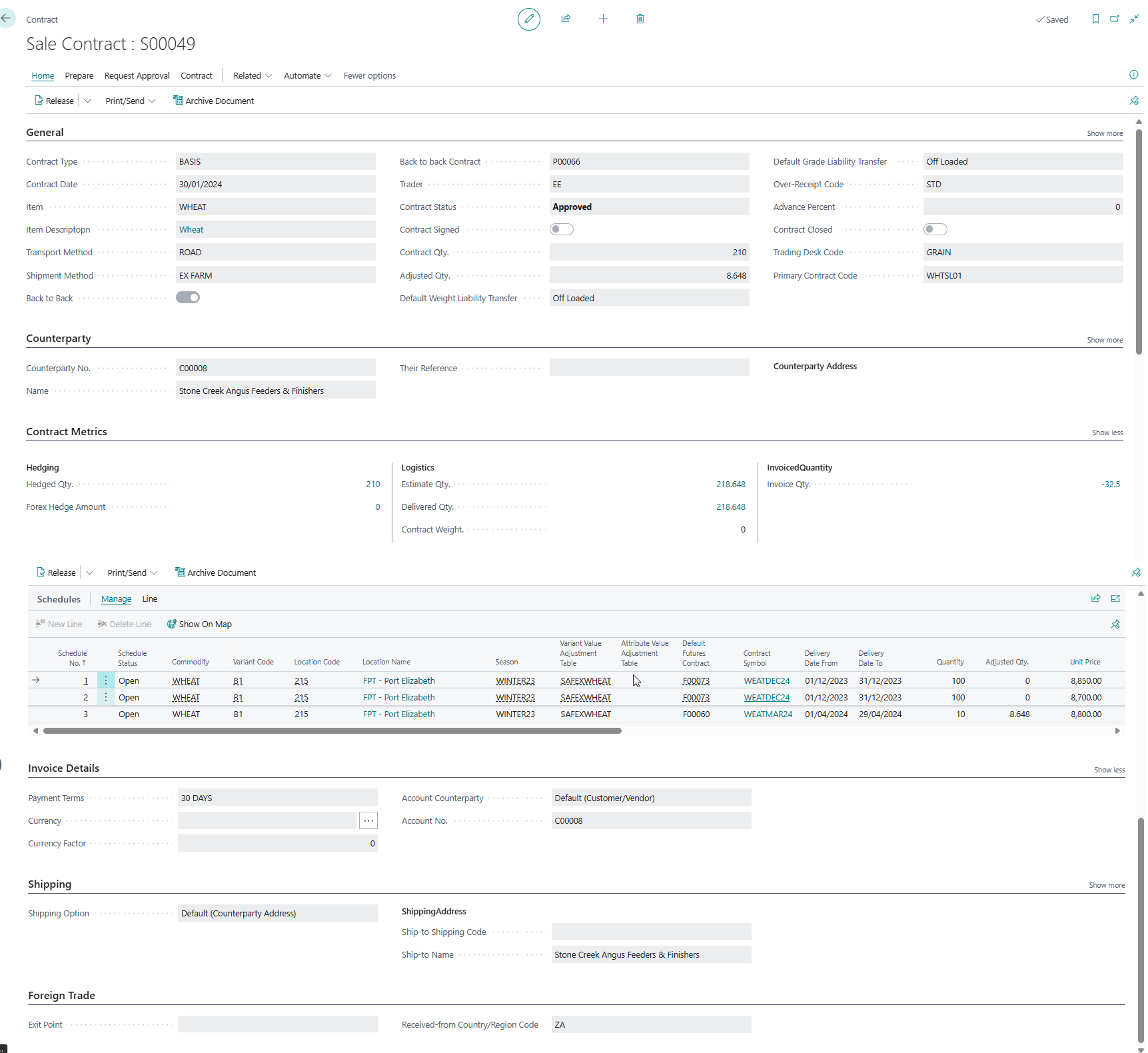
The Contract Card is designed to be the single point of management for all information related to a contract.
Contract Schedules define the delivery and financial aspects of the contract. A contract may have one or more delivery schedules used to manage distinct sets of data. A contract schedule covers product delivered to the same Location, for the same Variety or grade, within a defined period, and with the same pricing elements.
Contracts can be priced as either fixed-price or variable-priced contracts. Variable-priced contracts typically define a set of Basis elements and a Futures Contract against which the commodity will be priced, or hedged, through buying or selling futures contracts.
Futures Trading
CommLinc supports Futures Trading through its Futures Trades module. Trades executed on a futures exchange can be imported into CommLinc and allocated to individual Contract Schedules or Book Spreads. The screen below shows the Futures Trades list.
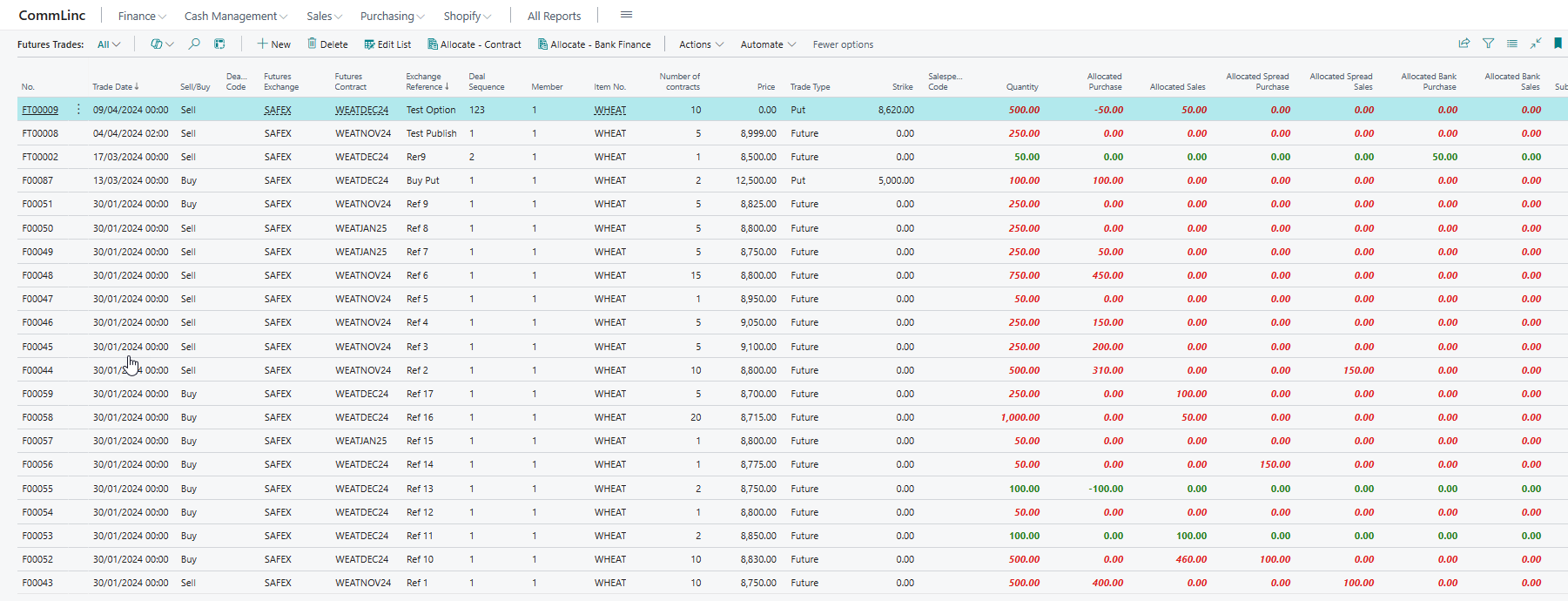
As with Contracts, the screen displays a comprehensive set of data, allowing the risk manager to view all aspects of individual trades. For management of total open positions the risk manager can use the Futures Contracts list, which summarizes all Futures Trades by Futures Contract.
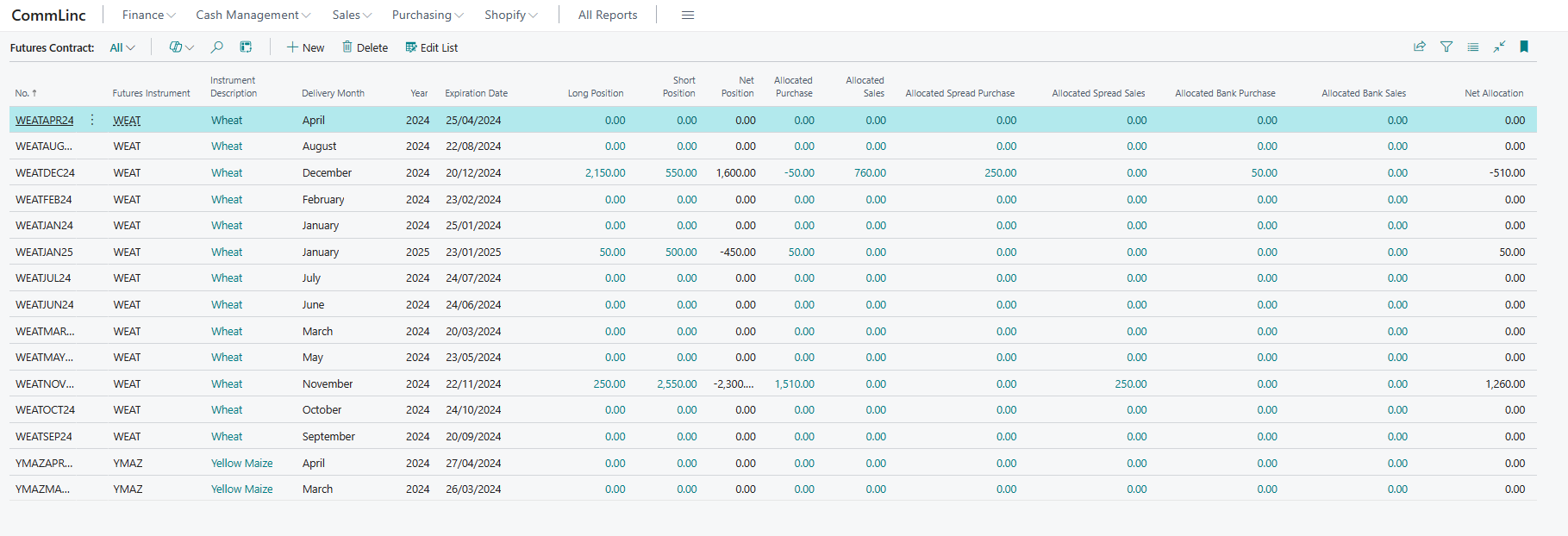
Futures Trades are grouped by futures contract to provide insight into the company's open position. Summary information includes the Long and Short positions, the quantity allocated to Purchase Contracts and Sales Contracts, the quantity allocated to Book Spreads, and finally those allocated to Bank Finance transactions.
Loads
Logistics completes the trade by providing the tools to manage the physical execution of contracts. CommLinc is designed to handle high volumes of transactions allocated to contracts, typically via road or rail transportation.
Loads are easily created from the Load Scheduler, which displays a list of Contract Schedules. Creating a load from the Load Scheduler defaults information such as Commodity, Counterparty and Delivery Details on the load, and automatically allocates the load to the contract schedule from which it was created.
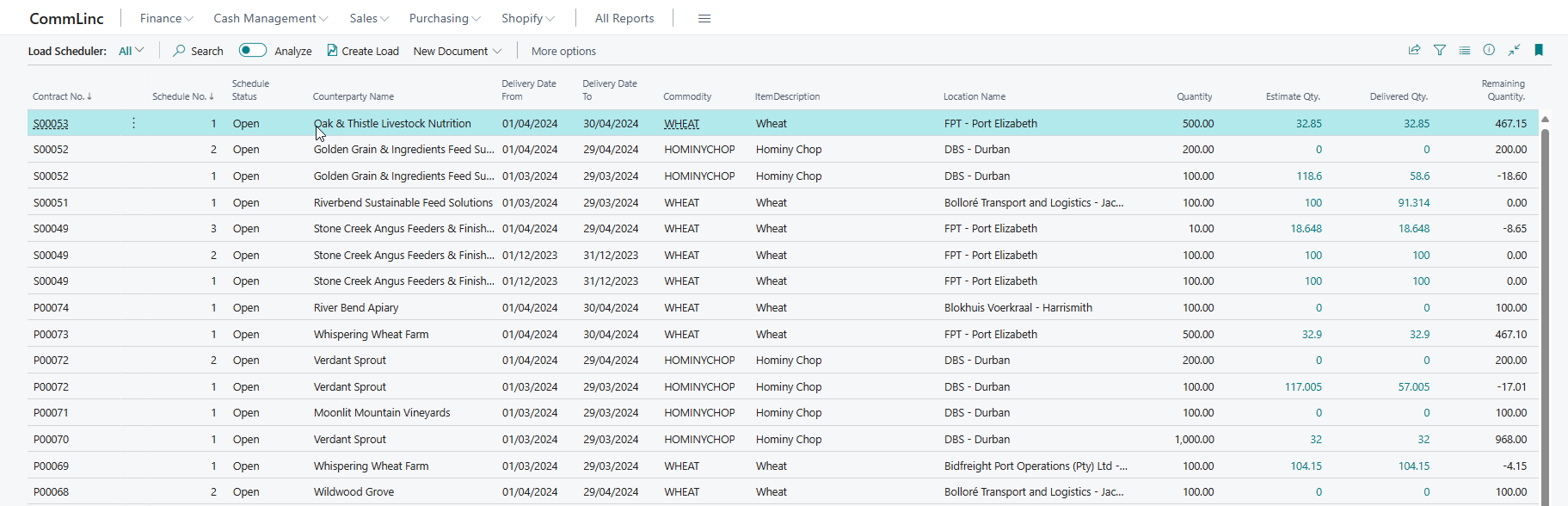
Loads can also be created directly from the Loads list. As with Contracts and Futures Trades, the Loads list provides the Logistics Manager with a comprehensive overview of all loads in the system.
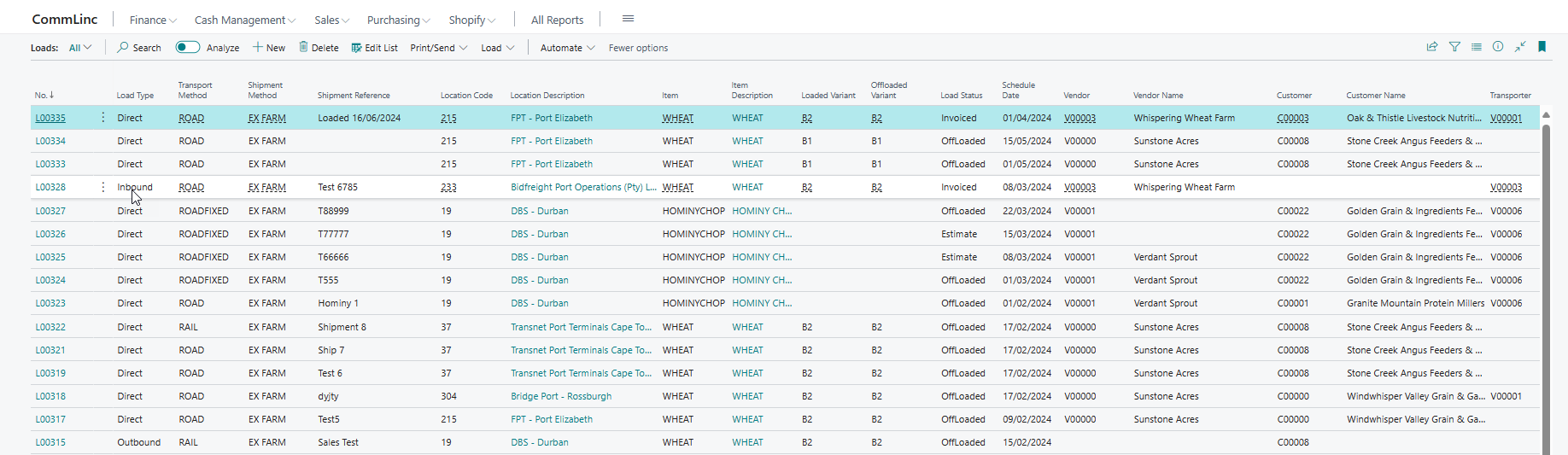
Loads form the operational heartbeat of CommLinc, as can be seen from the rich set of metrics available for each load.

Loads have a dual function in CommLinc. They affect stock by recording inbound and outbound stock movements through the creation of Purchase Orders and Sales Orders respectively. They are also the source of financial transactions through the generation of Purchase Invoices and Sales Invoices from those orders.
A Load represents a physical movement of a parcel of product from point A to point B in a vessel, typically a truck, rail carriage or silo certificate. Loads can therefore be Inbound, Outbound or Direct loads. Inbound loads must be allocated to Purchase Contracts, Outbound loads must be allocated to Sales Contracts, and Direct loads must be allocated to both Purchase Contracts and Sales Contracts.
This is all managed directly from within CommLinc, typically from the Load Card page.
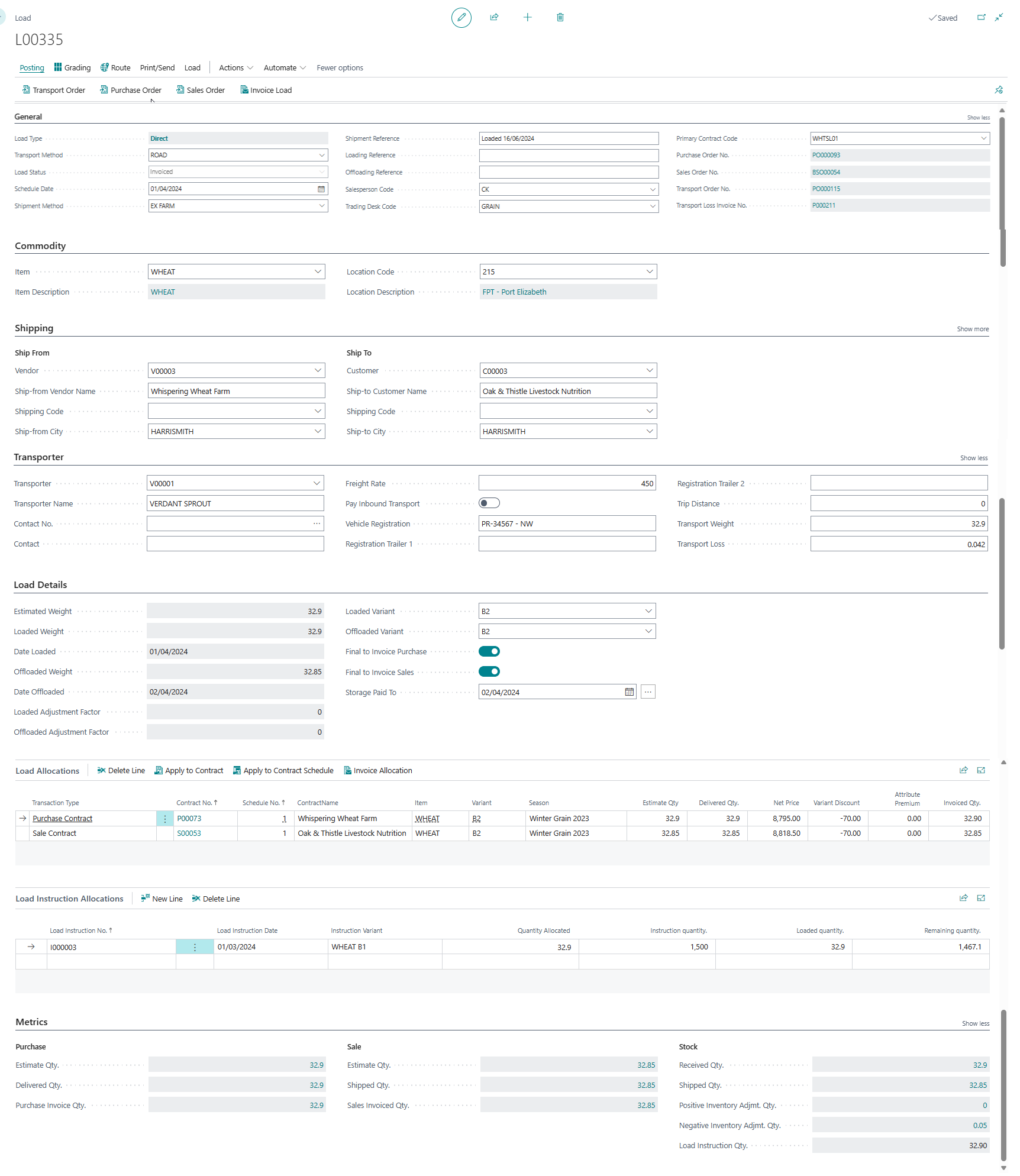
The Load Card consists of eight sections: General, Commodity, Shipping, Transporter, Load Details, Load Allocations, Load Instruction Allocations, and Load Metrics.
The General section defines the type of load, shipment method, and the associated Purchase Order, Sales Order and Transport Order. The transport order is a Purchase Order created in Business Central to pay the transporter for transport-related costs. All three orders can be created directly from the ribbon above the General section.
The Commodity section details the commodity and stock-keeping location of the load. Through Inventory Posting Setup in Business Central, posting rules for Item and Location combinations can be defined, allowing for granular accounting of inventory movements.
Shipping allows for the detailed capture of Ship From and Ship To addresses. Depending on the Load Type, these values are defaulted from the Ship From Vendor, Ship To Customer and physical stock-keeping location. Address details feed into the Load Confirmation printing and emailing functionality.
The Route icon at the top of the screen displays the route between the Ship From and Ship To addresses in the mapping application configured in Business Central, for example Google Maps.
The Transporter section contains all information needed to record the transporter's details and the agreed tariffs for carrying the commodity.
The Load Details section is where the weights and grades of the load are captured when received from the transporter or a third-party storage facility. Weight and Grading certificates can be attached directly to the load for convenience.
Through the Grading functionality, the user can capture the values of Item Attributes. These values are used by CommLinc to calculate Mass Adjustments and attribute Value Premiums.
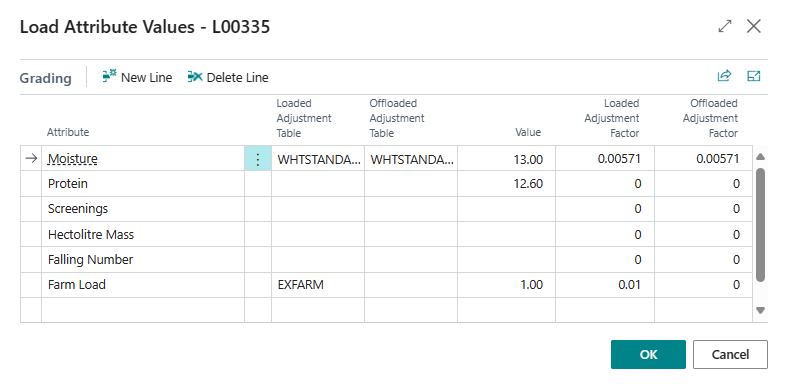
Depending on the specified Value, Load Adjustment Table and Offloaded Adjustment Table, a Mass Adjustment Factor is calculated for the loaded and offloaded quantities respectively.
The Load Allocation section defines which Contract Schedule or schedules the load is allocated to. CommLinc automatically splits loads across contract schedules, filling the oldest schedule first. If the final load of the contract is within the Contract Tolerance Percentage, the system will prompt the user to Under or Over allocate the load. Any under or over allocation is saved on the Contract Schedule as a quantity adjustment.
Load Instruction Allocation allows the user to allocate the load to any Load Instructions created at third-party storage locations. This feature is useful for managing stock shipped from third-party storage facilities.
The Metrics section summarizes related transactions in Purchasing, Sales and Stock.
Further Reading
- Setup Guide — Configure CommLinc master data, contract types, futures exchanges, items, and more.
- User Guide — Detailed instructions for all CommLinc screens and workflows.