CommLinc Setup Guide
Table of Contents
- Table of Contents
- Introduction
- CommLinc Setup
- Contract Types
- Pricing Statuses
- Futures Exchanges
- Items
- Seasons
- Transport Methods
- Packaging Types
Introduction
CommLinc master data setup is required to configure the parameters and static data elements needed for processing transactional data in CommLinc.
Setup is recommended in the following order:
- CommLinc Setup — global settings and defaults
- Contract Types — pricing and hedging behaviour
- Pricing Statuses — allocation and invoicing controls
- Futures Exchanges — exchanges, dealers, instruments, and contracts
- Items — commodities, variants, attributes, and mass adjustment tables
- Seasons — growing and marketing seasons
- Transport Methods — transport types and item charges
- Packaging Types — packaging options
CommLinc Setup
The Setup table contains the master settings used to initialise default values and behaviours in CommLinc.

Number Series
The following number series must be configured before creating documents of each type. Number Series can be managed through the standard No. Series functionality in Business Central.
| Field | Document type |
|---|---|
| Purchase Contract Nos. | Purchase contracts |
| Sales Contract Nos. | Sales contracts |
| Load Nos. | Loads |
| Load Instruction Nos. | Load instructions |
| Futures Trade Nos. | Futures trades |
| Futures Spread Nos. | Futures spreads |
| Bank Finance Nos. | Bank finance records |
| Related Load Nos. | Related load groups |
Select Number Series Allowed — when enabled, users are presented with a choice of number series when creating a new document, rather than having the next number automatically assigned. Leave disabled for automatic sequential numbering.
Load Defaults
Default Load Type specifies the load type pre-selected when a user creates a new load.
Default Load Size specifies the value pre-filled in Estimated Weight when a new Load is created.
Load In Transit Days is the number of days added to Date Loaded to default the Date Offloaded. This setting is ignored when Load Status Determined By is set to Date.
Load Status Determined By controls when a load advances to the next status. Options are:
- Weight — status advances based on loaded/offloaded weight being captured.
- Date — status advances based on dates being captured. Date Offloaded is not automatically defaulted from Date Loaded.
- Variant — status is tied to variant capture. Offloaded Variant is not automatically defaulted from Loaded Variant.
Loads View Default Days specifies the default number of days shown when the Loads View page is opened. The Date From Filter is set to Work Date minus this number of days, and the Date To Filter to Work Date.
Invoicing Controls
Variant Mandatory — when enabled, loads cannot be marked Final to Invoice without both Loaded Variant and Offloaded Variant being set.
Pricing Status Mandatory — when enabled, a Contract Schedule must have a Pricing Status assigned before loads can be allocated to it or invoices raised against it. The Pricing Status setup controls which statuses allow allocation and which allow invoicing.
Dimension 1 Mandatory On Load — when enabled, Dimension Code 1 must be populated on the load and on every load allocation before Final to Invoice can be ticked.
Dimension 2 Mandatory On Load — same requirement for Dimension Code 2.
Default Purchase Dimensions — for Direct loads, when enabled the system automatically copies Dimension Codes from the Sales allocation to the corresponding Purchase allocation. Useful when purchase and sales dimensions should always match on a direct load.
Futures and Options
Option Premium Basis Element specifies which Basis Element is used to record option premiums when Put or Call options are used in contract schedule pricing. This basis element must also be present in the contract schedule's basis set (defaulted from the Contract Type). If it is not configured here, allocating an option trade to a schedule will error.
Moisture Basis Element specifies the Basis Element used to record moisture-related adjustments on load allocations. This is used in contract reporting to identify and separate moisture corrections from other basis elements.
Contacts and Signatures
Company Customer No. specifies the Customer record that represents the company itself. This is used to look up internal company contacts for the Trader Manager and Company Signatory fields on contracts, and for e-signature workflows.
Contract Types
Contract types drive the behaviour of contracts.
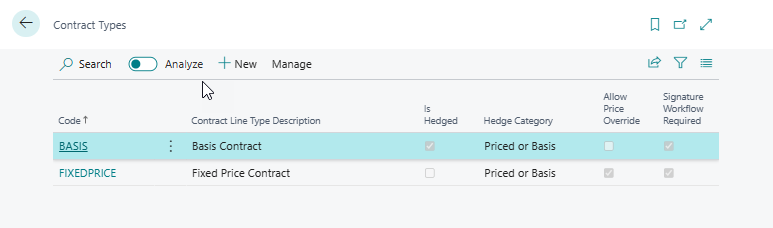
Editing a contract type opens the Contract Type page. On the Contract Type record, Is Hedged determines whether Futures Trades can be associated with Contract Schedules to calculate the Contract Schedule price.
Hedge Category is a reporting field used to group contracts.
Allow Price Override indicates whether the calculated price on hedged contracts can be overridden by the user.
Signature Workflow Required indicates whether an electronic signature workflow is required for contracts of this contract type before they can be released.
Basis Final Default specifies the default value of the Basis Final flag on contracts created with this type. When Basis Final is true on a contract, it indicates that all basis elements have been finalised and advance invoicing is permitted. Set this to true on contract types where basis is always fixed at contract creation; leave it false where basis is determined closer to delivery.
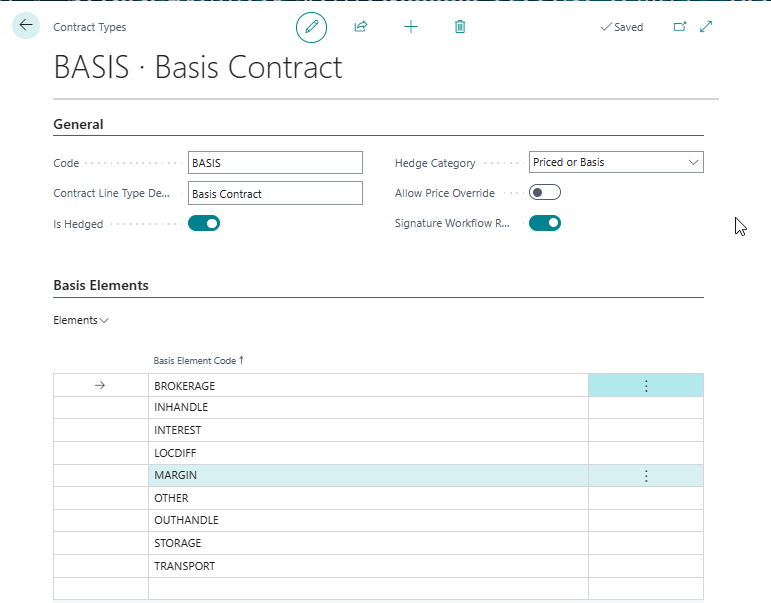
A set of default Basis Elements can be defined per Contract Type. When new contracts are created, a standard set of basis elements is generated as defined on the Contract Type. Basis elements can be added or removed on individual contract schedules after creation, but the default set saves time for common contract structures.
Each element line requires a valid Basis Element Code — this field is mandatory and the line cannot be saved without it.
Pricing Statuses
Pricing Statuses affect invoicing and allocation behaviour on Contract Schedules.
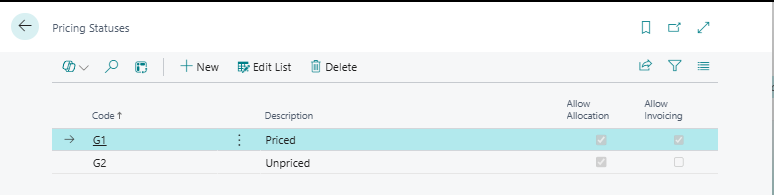
Code is the unique identifier for the record.
Description describes the Pricing Status.
Allow Allocation indicates whether Loads can be allocated to Contract Schedules with this Pricing Status.
Allow Invoicing indicates whether Load Allocations on Contract Schedules with this Pricing Status can be invoiced.
Futures Exchanges
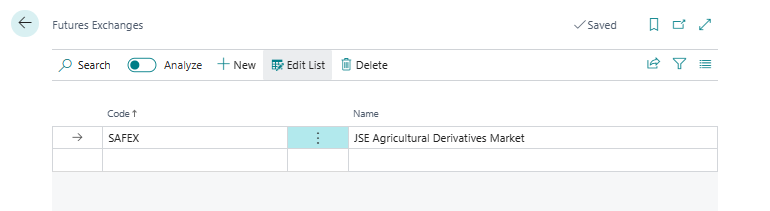
Futures Exchanges define the futures exchanges on which futures contracts can be traded in CommLinc.
Futures Exchange Dealer
Futures Exchange Dealers define the individuals executing futures trades on the relevant Futures Exchanges.
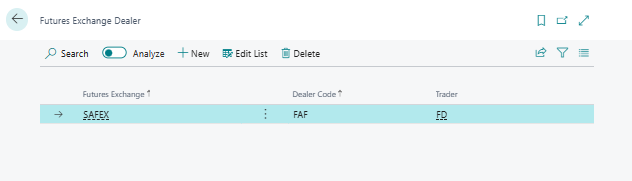
The Dealer is linked to the standard Business Central Salespeople/Purchaser functionality. Both Dealer Code and Salesperson/Purchaser Code are mandatory — a dealer record cannot be saved with either field blank. When a Dealer Code is entered on a futures trade, the Salesperson/Purchaser Code is automatically populated from the dealer record.
Futures Instruments
Futures Instruments represent the various commodities traded on the different exchanges. Each Instrument is linked to a Futures Exchange and an Item.
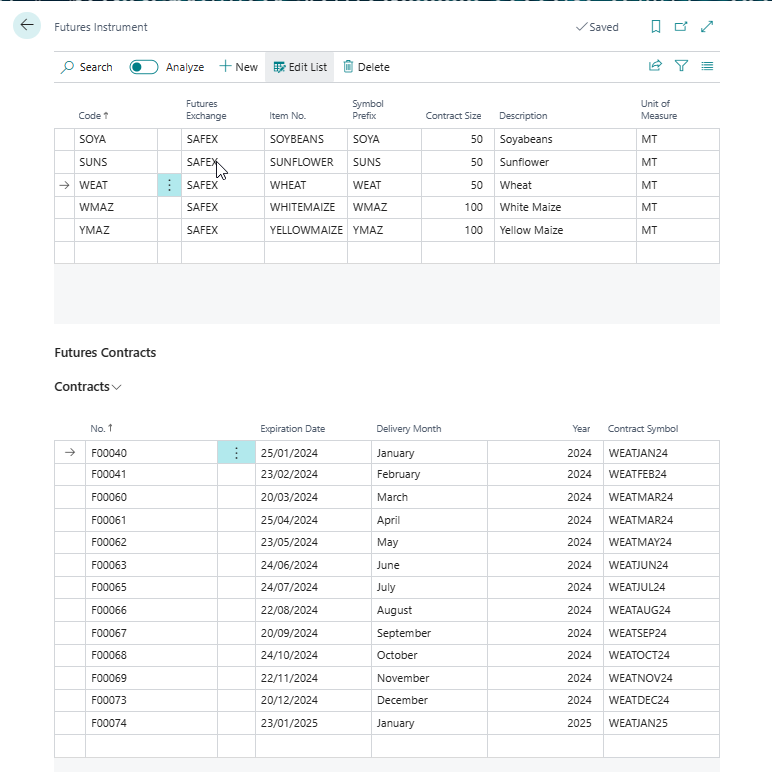
Futures Exchange links the instrument to the exchange on which it is traded.
Item No. links the instrument to the commodity it represents. When a Futures Contract is selected on a futures trade, the Item is automatically populated from this field.
Symbol Prefix is the ticker symbol prefix for this instrument (e.g. "CBOT-W" for Chicago wheat). The combination of Futures Exchange, Symbol Prefix, and Description must be unique.
Contract Size is the number of commodity units per single futures contract. CommLinc uses this to calculate trade quantity: Quantity = Number of Contracts × Contract Size. It is also used to convert option premiums to a per-unit value.
Unit of Measure specifies the unit of measure that corresponds to the Contract Size — typically tons or bushels depending on the exchange.
Contract Size and Unit of Measure must match the unit of measure used on the commodity item. If they differ, quantity calculations on contract schedule pricing will be incorrect.
The combination of Futures Exchange, Symbol Prefix, and Description must be unique — attempting to create a second instrument with the same three values will produce a duplicate-key error.
Futures Contracts
Each Futures Instrument has a set of Futures Contracts representing the delivery months that can be traded. A Futures Contract is uniquely identified by its Instrument, Delivery Month, and Year — the system will not allow duplicate combinations. When an Expiration Date is entered, the Delivery Month and Year are automatically derived from it.
Items
Items are used to represent commodities in CommLinc.
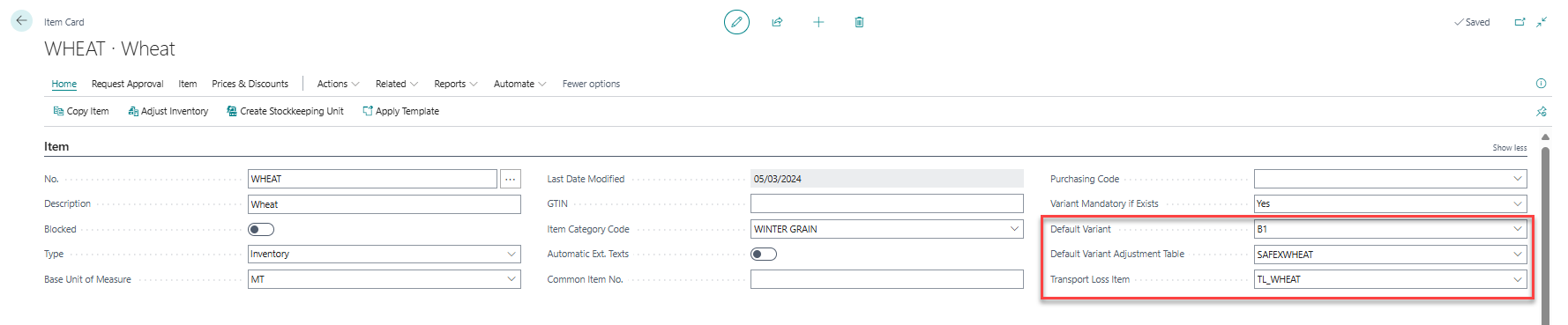
Three additional fields have been added to the Item Table: Default Variant, Default Variant Discount Table and Transport Loss Item.
Two important fields in the Items table are Type and Costing Method. Care should be taken when selecting values for these fields — once transactions have been posted against an Item in Business Central, the Type and Costing Method cannot be modified. To manage stock in Business Central, Item Type must be set to Inventory.
Default Variant specifies the default variant to be used when creating Contract Schedules. Generally grade discounts Variant Value Adjustments are calculated using the default variant as the base.
Default Variant Adjustment Table specifies the default variant adjustment table to be used when creating contract schedules.
Transport Loss Item specifies the related Item to be used when creating charges on Transport Purchase orders for transport losses. If Transport Loss items are created as service items charges for transport losses can be excluded from effecting stock. The price charged per unit of measure of the transport loss item should be updated periodically.
Item Variants
Item Variants are used to represent Commodity Grades.
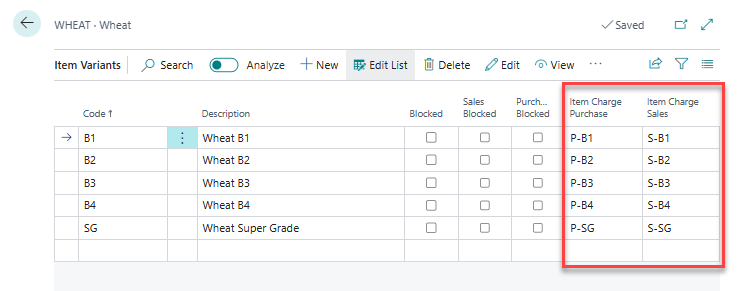
Two fields have been added to the Item Variant table, namely Item Charge Purchase and Item Charge Sales. These are standard Items Charges which indicate the Item Charges to be used when premiums or discounts are generated during Invoicing due to different Variants (grades) having been delivered than what was contracted.
Variant Value Adjustment Table
Each Variant Discount Table is associated with a particular Item and has a related set of records in the Variant Discount Matrix. The Variant Discount Matrix specifies the discount or premium applicable for each variant pair or the Item.
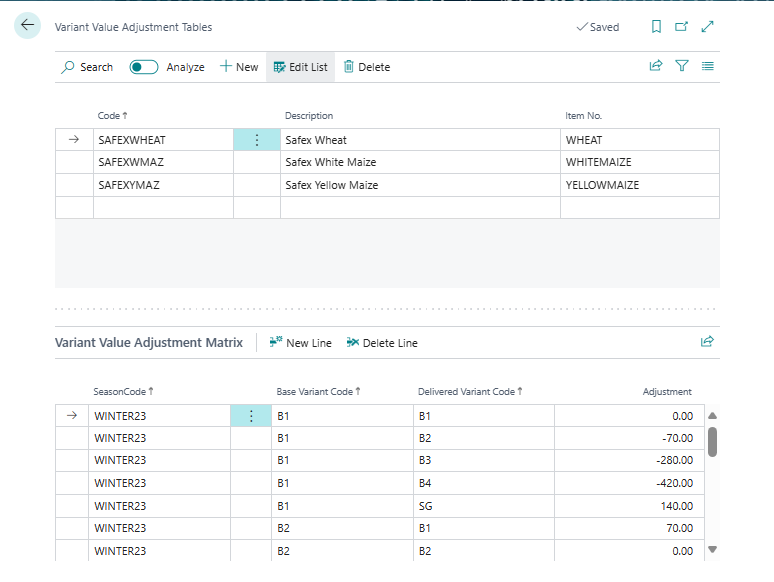
The Variant Value Adjustment Matrix above specifies, for example, for a purchase contract for Item Wheat Variant B1, and the producer delivers a Variant B2 a discount of 70 per ton at the base currency will be applied at invoicing. Should the producer deliver SG (Super Grade) a premium of 140 per ton at the base currency will be applied at invoicing. The relevant Item Charge Purchase defined on the Item Variant will be used for the charge line on the invoice, in the example above P-B1 and P-SG.
Item Attributes
Item Attributes are part of standard Business Central, but have been extended to include two additional fields. As with Variants, Item Charge Purchase and Item Charge Sales fields have been added. These are standard Items Charges in Business Central which can be edited in the Item Charges page. Item Attributes applicable to an Item can be defined on ether on an Item or for all Items in an Item Category. When capturing a Load the Grading function can be used to capture the values of attributes for the applicable load.
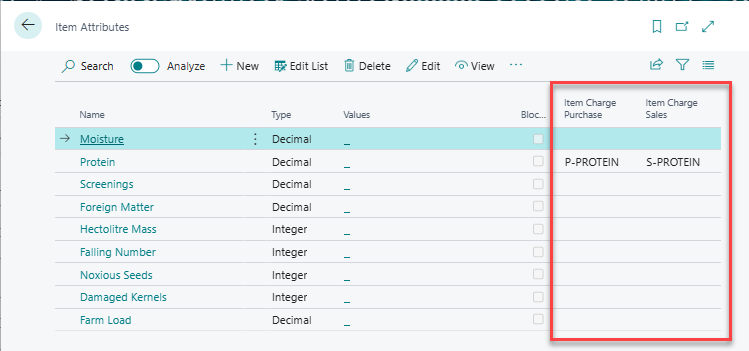
Item Charge Purchase and Item Charge Sale indicate the Item Charges to be used when premiums or discounts are generated during invoicing due to attribute values (grade values) falling within ranges specified in the Attribute Value Adjustment Matrix.
Attribute Value Adjustment Table
Each Attribute Value Adjustment Table is associated with a particular Item and has a related set of records in the Attribute Value Matrix. The matrix specifies the premium or discount applicable per season based on the measured attribute value relative to the Peak Value.
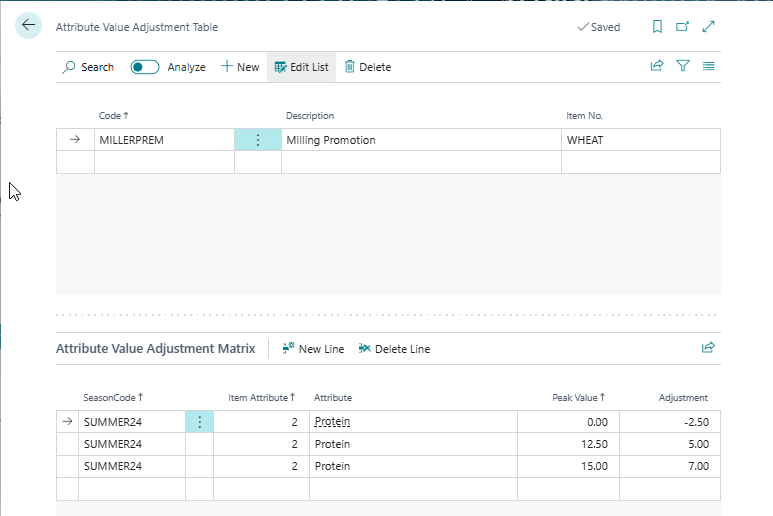
The Attribute Value Adjustment Matrix above defines, for example, the discount or premium applicable when a specific attribute value (such as protein or moisture content) falls within a defined range. The relevant Item Charge Purchase or Item Charge Sales defined on the Item Attributes will be used for the charge line on the invoice.
Attribute Mass Adjustment Table
CommLinc calculates Mass Adjustments based on the attribute values entered in the Grading screen for Loads. Through the Attribute Mass Adjustment Tables, records can be created with different Tolerance Percentages (%).
The Tolerance % represents the permissible value range for an attribute. When an attribute exceeds this tolerance, the system adjusts the mass by applying the percentage above the tolerance.
The Moisture Correction Indicator specifies whether the calculated factor should be based on a Moisture Correction basis.
Mass Adjustment tables can be specified on Items and Locations through Item Mass Adjustment Tables.
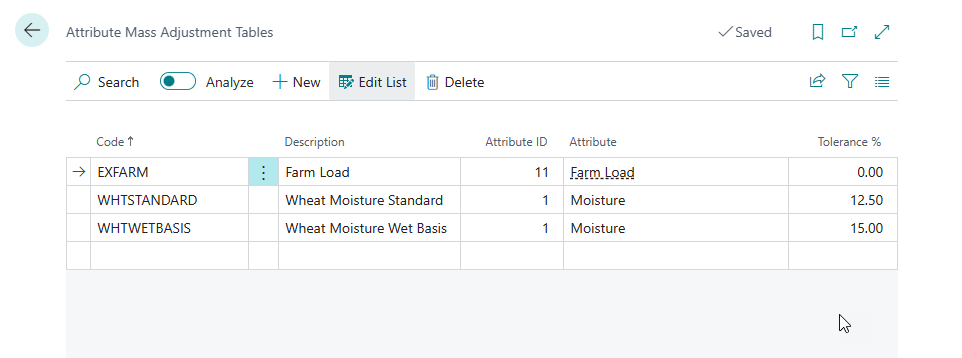
In the tables above, two Mass Adjustment Tables are defined for Moisture. WHTSTANDARD as a tolerance of 12.5% while WHTWETBASIS has a tolerance of 15%. Transactions where WHTSTANDARD are specified will be allowed to deliver Items with Moisture up to 12.5%, should product with 14% moisture be delivered it will result in a 1.5% mass adjustment. Items with WHTWETBASIS will be allowed to deliver up to 15% moisture.
Item Mass Adjustment Tables
Item Mass Adjustment tables specify the default mass adjustment tables for Items, or for specific Item and Location combinations. An Item and Location combination takes precedence over an Item-only record.
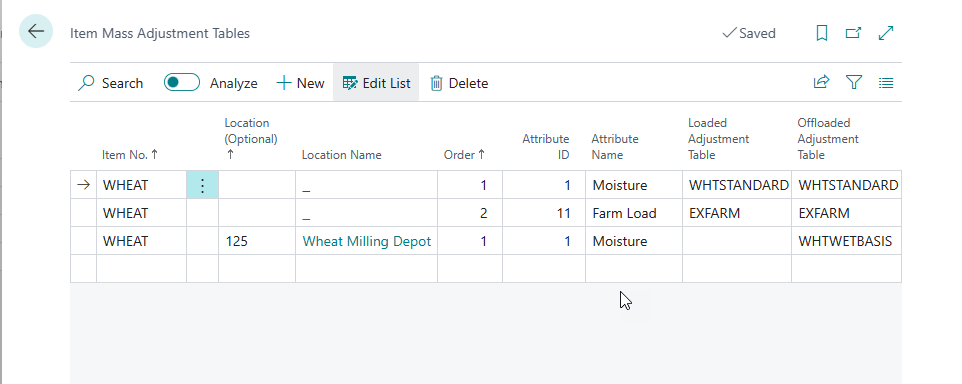
In the example above Wheat would by default use the WHTSTANDARD table for loading and offloading loads for all locations except Location Wheat Milling Depot which will accept loads using the WHTWETBASIS. The Wheat Milling Depot has no default mass adjustment table for loading loads.
Seasons
Seasons are used to specify commodity growing and marketing seasons by Item Category.
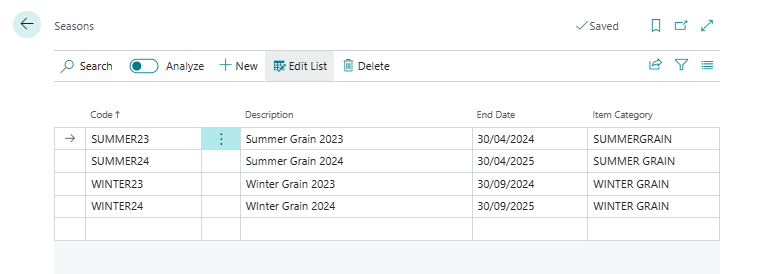
Code is the unique identifier for the season.
Description is a free-text description of the season (e.g. "2024/25 Wheat Season").
End Date is the last date of the season. This is used in two ways: (1) to validate that a Contract Schedule's item is eligible for the selected season, and (2) in the Storage Paid To lookup on loads — when a user confirms "Year Storage", the system automatically sets Storage Paid To to the End Date of the applicable season.
Item Category links the season to a specific commodity category. Only items belonging to this Item Category (or its sub-categories) may be used on Contract Schedules with this season. Attempting to combine an incompatible item and season on a schedule will result in an error.
Attribute Value Adjustments and Variant Value Adjustments are indexed by season to facilitate pricing specifications per season. Both adjustment tables must have entries for the relevant season before they can be applied at invoicing.
Transport Methods
CommLinc extends the Transport Method table in Business Central to include Base Unit of Measure, Load Rate, Loss Tolerance % and Certificate Transfer. For each transport method a related set of records is added to define the Inbound and Outbound Item Charge per Item Category. Item Charges are used to define the Line Item Charge type when creating Purchase Orders and Invoices for transport in CommLinc.
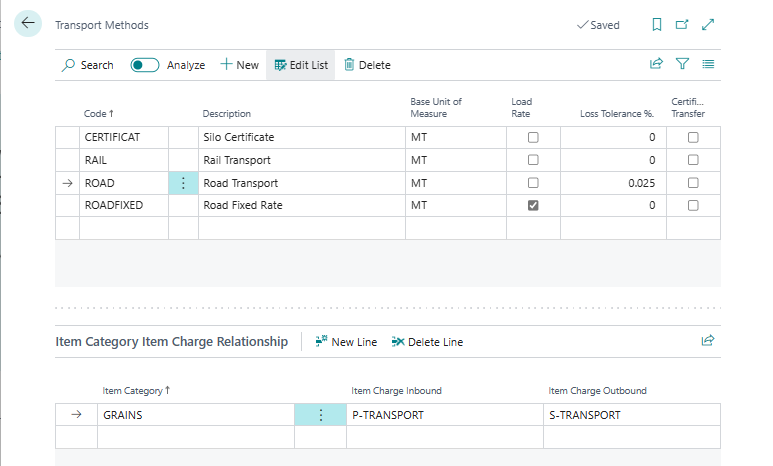
Base Unit of Measure specifies the unit of measure used for quantity calculations on loads and contract schedules using this transport method. This field is required — if left blank, the system will prompt when a contract schedule or load attempts to use the transport method and will block the action if it remains unset.
Load Rate — when enabled, the transport cost is a fixed rate per load rather than a per-unit-of-measure rate. When disabled, the Freight Rate on the load is multiplied by the Transport Weight to calculate the transport cost.
Loss Tolerance % specifies the percentage of transport loss that is acceptable without financial recovery from the transporter. Transport Loss is calculated as: (Loaded Weight − Offloaded Weight) − (Transport Weight × Loss Tolerance %). Any loss above this tolerance is shown as Transport Loss on the load.
Certificate Transfer — when enabled, no physical transport occurs; ownership transfers by certificate or stock transfer. The Transporter section is hidden on loads using this transport method, and Pay Handling Fee will not be automatically set. When disabled (physical transport), Pay Handling Fee is automatically set to true on Inbound loads when the transport method is selected.
In the example above Road Fixed Rate is flagged as a Load Rate, meaning that the transport rate is calculated as a rate per load as opposed to the usual rate per unit of measure, normally rate per tons. Road transport has a transport loss tolerance of 0.025% which specifies the maximum transport loss which will be tolerated per load. Certificate Transfer indicates that the movement of product on contracts with this transport method will be via transfer of ownership via certificate or stock transfer, therefore there will be no physical transport involved.
The per-item-category Item Charge configuration for transport was previously managed through a separate "Transport Method Item Relation" table. This table has been removed — Item Charge setup for transport now resides directly on the transport method record itself.
Packaging Types
Packaging type is an information field which can be used on Contracts and Loads.